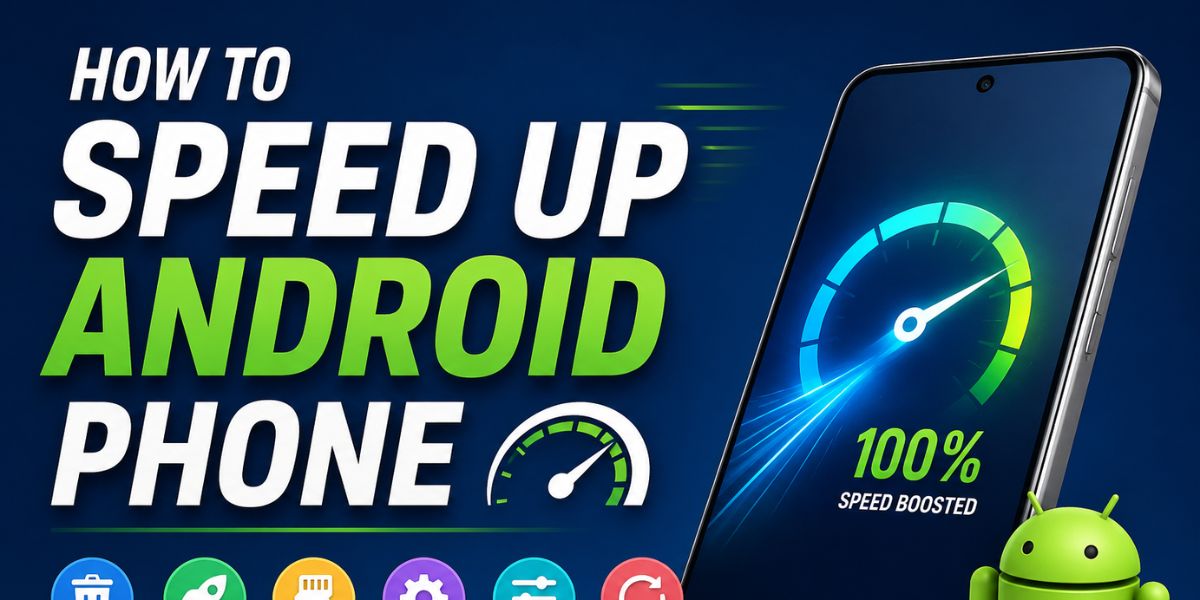
How to Speed Up Android Phone in 2026: Complete Guide for Better Performance
Android phones have become more powerful, but many users still face slow performance after months of usage. Apps take longer to open, games lag, the battery drains quickly, and the phone may freeze during normal tasks. These issues are common on both budget and premium Android devices. There are many ways to improve phone speed without buying a new device.
This guide explains how to speed up Android phone performance using safe and updated methods. From clearing storage and removing unused apps to enabling performance settings and updating software, every tip in this article is practical and beginner-friendly. Whether you use your phone for gaming, work, social media, or photography, these optimization techniques can help your Android device run faster and smoother in 2026.
Why Android Phones Become Slow Over Time
Android phones slow down for many reasons. One major cause is storage overload. When internal storage becomes nearly full, the device struggles to manage android apps and files efficiently. Background apps also consume RAM and processing power, especially social media and messaging apps that constantly refresh data.
Cached files can become corrupted or too large, causing performance issues. Older software versions may contain bugs that reduce speed and stability. Battery degradation can also affect processing performance on some devices. Android systems will be smarter than before, but regular maintenance is still important to keep smartphones running smoothly and efficiently for long-term daily use.
Restart Your Android Phone Regularly
One of the simplest ways to improve Android performance is to restart the device regularly. Many users keep their phones running for weeks without rebooting them. Background processes, temporary files, and system errors can build up and reduce speed. Restarting clears temporary memory and refreshes system operations.
It also stops hidden apps that may be draining RAM or battery in the background. Android phones handle multitasking better, but occasional restarts still help maintain stability. Restarting your phone at least once every few days can noticeably improve responsiveness, app loading speed, and overall system smoothness without needing advanced technical knowledge.
Free Up Storage Space for Better Performance
Storage management plays a huge role in Android phone speed. Phones with low free storage often become slow and unresponsive. Try keeping at least 20% of storage empty for smooth performance. Delete duplicate photos, old videos, unnecessary downloads, and unused documents. Remove apps you no longer use. Many Android devices now include built-in storage cleaners that safely remove junk files.
Cloud services can also help move media files online to save local storage. apps are larger than ever, especially games and AI-powered applications, making storage optimization even more important. Regularly cleaning your storage can significantly improve app speed and reduce lag problems.
Clear Cache Files Safely
Cache files help apps load faster, but excessive cache data may create performance problems over time. Social media apps, browsers, and streaming platforms often store large amounts of temporary data. Clearing the app cache removes unnecessary files without deleting important personal information. You can clear the cache individually through Android settings under app management.
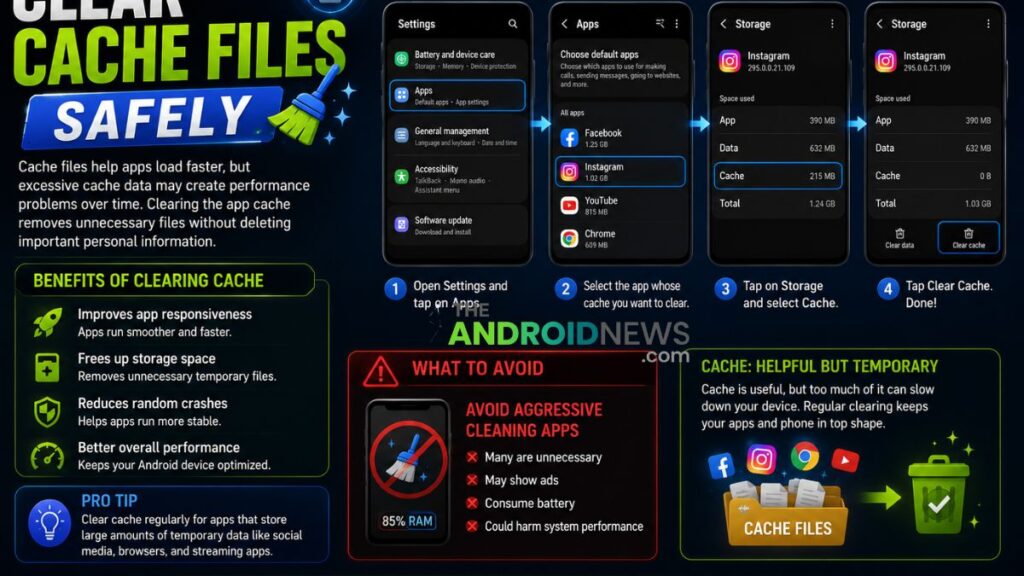
Avoid using aggressive cleaning apps because many are unnecessary and may display ads or consume battery. Android includes better automatic cache management, but manual cleaning still helps when apps become sluggish. Clearing the cache regularly can improve app responsiveness, free storage space, and reduce random crashes on older Android devices.
Remove Unused Apps and Bloatware
Many Android phones come with pre-installed apps that users never use. These apps, often called bloatware, can consume storage, RAM, and battery in the background. Removing or disabling unnecessary apps can improve overall performance. Go through your app list carefully and uninstall apps you have not used in months.
Disable manufacturer apps that cannot be removed if they are not essential. Some Android brands will offer easier bloatware management tools, making optimization simpler for users. Keeping only important apps on your phone reduces background activity and allows your processor and memory to focus on the tasks that truly matter every day.
Update Android Software and Apps
Software updates are important for both security and performance improvements. Android manufacturers regularly release updates that fix bugs, improve battery efficiency, and optimize device speed. Outdated apps can also create compatibility problems that slow down your phone. Always keep your Android system and applications updated through official sources like the Google Play Store.
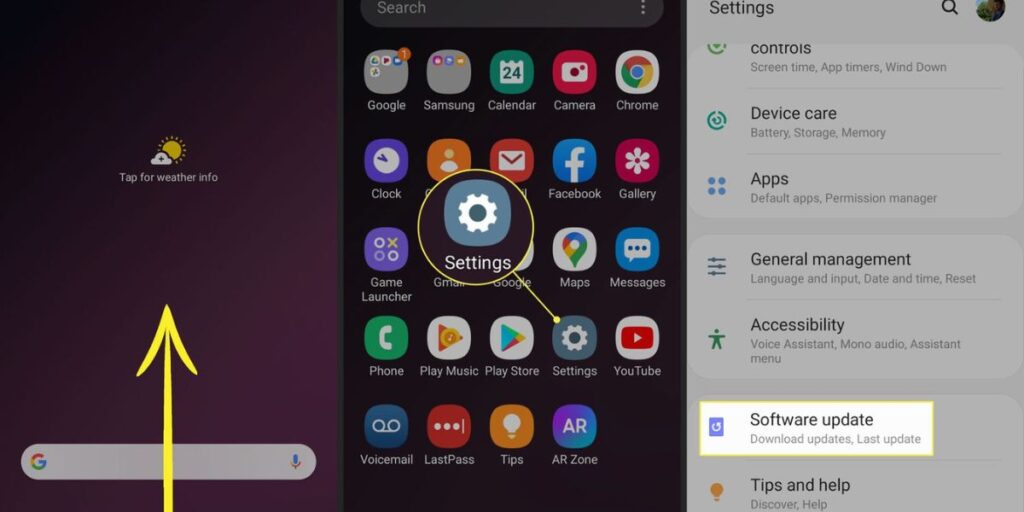
Many updates include AI-based performance enhancements that improve app launching and multitasking. Before updating, ensure your device has enough battery and storage space. Regular updates help your phone stay fast, secure, and compatible with modern applications while reducing crashes, overheating, and system instability during daily use.
Reduce Background App Activity
Many apps continue running in the background even when you are not actively using them. Messaging apps, social media platforms, fitness trackers, and shopping apps frequently refresh data, consuming RAM and battery power. Limiting unnecessary background activity can improve Android speed. Use battery optimization settings to restrict apps that do not need constant updates.
Some phones allow users to automatically put inactive apps into sleep mode. Android includes smarter battery and background management systems, but manual control is still useful. Reducing background processes helps improve gaming performance, app loading times, and battery life while preventing overheating during long usage sessions throughout the day.
Disable Animations for Faster Response
Android animations make the interface look smooth, but they can make slower phones feel less responsive. Reducing or disabling animations can improve user experience, especially on older devices. You can change animation settings through Developer Options by lowering animation scales or turning them off completely.
This does not increase processor power, but it makes transitions appear faster. Modern Android phones will use advanced visual effects, which may still impact low-end devices. Users who prefer speed over visual effects often notice immediate improvements after reducing animations. This simple tweak helps menus open faster and improves overall navigation speed on many Android smartphones.
Use Lite Versions of Apps
Popular apps like Social media Facebook, Messenger, and TikTok consume significant resources. Lite versions of apps are designed for lower RAM usage, smaller storage size, and reduced battery consumption. These apps work well on budget Android devices or phones with limited hardware.

Many developers will continue offering lightweight versions optimized for faster performance and slower internet connections. Switching to lite apps can reduce lag and improve multitasking. Web versions of some services can also save resources compared to full applications. If your phone struggles with performance, replacing heavy apps with lighter alternatives can make a noticeable difference in daily speed and overall device responsiveness.
Manage Widgets and Live Wallpapers
Widgets and live wallpapers may look attractive, but they constantly use processing power and battery resources. Weather widgets, news feeds, animated wallpapers, and live clocks update continuously in the background. Too many active widgets can slow down home screen performance and reduce battery life.
Using static wallpapers and limiting widgets can help your Android phone run more smoothly. Phones have improved efficiency, but excessive customization still affects performance, especially on mid-range and budget devices. Keep only essential widgets on your home screen and remove decorative elements you rarely use. A cleaner home screen can improve speed, responsiveness, and overall user experience significantly.
Scan for Malware and Harmful Apps
Malware and unsafe apps can seriously affect an Android phone’s performance. Fake cleaning apps, suspicious APK files, and unauthorized downloads often contain hidden processes that consume system resources. Symptoms may include overheating, battery drain, pop-up ads, and slow operation.
Use trusted security apps from the Google Play Store to scan your device regularly. Avoid installing apps from unknown sources unless necessary. Android security systems are more advanced, but cyber threats still exist. Google Play Protect also helps identify harmful apps automatically. Removing suspicious software can improve phone speed, protect personal data, and reduce unwanted background activity that slows down your device.
Optimize Gaming Performance on Android
Mobile gaming is more demanding in 2026 because games use advanced graphics, AI features, and online connectivity. To improve gaming performance, close unnecessary apps before starting games. Enable Game Mode if your phone supports it. Lower graphics settings in demanding games to reduce lag and overheating. A stable internet connection also improves multiplayer gaming performance.
Keep your phone cool because high temperatures can reduce the processor speed automatically. Some gaming phones include dedicated cooling systems and performance boosters. Clearing RAM and freeing storage before gaming sessions can also help. Proper optimization allows smoother gameplay, better frame rates, and reduced stuttering on Android devices.
Avoid Fake Speed Booster Apps
Many users install speed booster apps hoping for instant performance improvements. Unfortunately, most cleaning and booster apps provide little real benefit and may even slow the device further through ads and background activity. Android already includes built-in memory and battery management systems. Constant RAM cleaning is unnecessary because Android automatically manages resources efficiently.
Google continues improving Android optimization, reducing the need for third-party booster tools. Instead of relying on fake optimization apps, focus on genuine maintenance methods like freeing storage, updating software, and removing unused applications. Avoiding unnecessary cleaner apps can actually improve phone speed, battery life, and long-term device stability significantly.
Use Cloud Storage and Streaming Services
Photos, videos, and downloaded media consume large amounts of storage. Cloud storage services allow users to store files online instead of keeping everything on the device. Streaming services also reduce the need for downloading movies and music locally. Cloud integration is faster and more affordable than ever, making it easier to manage phone storage efficiently.
Services like Google Photos automatically back up images and provide free local storage safely. Keeping your internal storage organized improves Android performance and reduces lag. Using cloud-based solutions is especially helpful for users who record high-resolution videos or store large collections of media files regularly on their smartphones.
Factory Reset as a Last Option
If your Android phone remains slow after trying all optimization methods, a factory reset may help. Resetting removes unnecessary files, corrupted settings, and hidden software problems that build up over time. Before resetting, back up important photos, contacts, and documents because all personal data will be erased.
After the reset, install only essential apps instead of restoring everything immediately. Factory resets remain one of the most effective ways to restore original performance on older devices. This should only be done when other solutions fail. A clean system setup often improves speed, battery life, and stability dramatically.
Best Habits to Keep Your Android Phone Fast
Maintaining Android speed requires consistent habits rather than one-time fixes. Regularly clean storage, uninstall unused apps, and restart the phone occasionally. Avoid downloading suspicious applications or filling the storage. Keep software updated and monitor battery health over time. Protect your device from overheating by avoiding excessive gaming while charging. Use official chargers and accessories for safe performance.
Android devices will be more intelligent and optimized, but responsible usage still matters greatly. Small maintenance habits can extend device lifespan and prevent major slowdowns. Users who care for their phones properly often enjoy smoother performance for several years without needing immediate hardware upgrades or replacements.
How to Speed Up Android Phone FAQs
Why is my Android phone getting slow?
Android phones often slow down because of low storage, too many background apps, outdated software, or heavy animations. Over time, cached files and unused apps can also reduce performance and make the device lag.
How can I make my Android phone faster?
You can speed up your phone by deleting unused apps, clearing cache files, updating Android, reducing animations, and restarting the device regularly. Keeping at least 20% storage free also improves performance.
Does clearing the cache improve Android speed?
Yes, clearing app cache can improve speed because it removes temporary files that may become corrupted or too large. Apps like browsers and social media apps usually store a lot of cache data.
Can low storage slow down an Android phone?
Yes, when storage is almost full, Android devices struggle to run apps smoothly. Photos, videos, and large apps take up space and reduce system performance. Freeing storage can make the phone faster.
Do software updates help improve phone performance?
Software updates often include bug fixes, security improvements, and performance optimizations. Installing the latest Android updates can help your phone run more smoothly and reduce lag issues.
How to Speed Up Android Phone: Final Words
Learning how to speed up Android phone performance is essential for maintaining a smooth and reliable user experience in 2026. Slow performance is usually caused by overloaded storage, background apps, outdated software, or poor maintenance habits. Fortunately, most problems can be fixed without professional repair or expensive upgrades.
By clearing unnecessary files, updating apps, reducing background activity, and using safe optimization methods, users can significantly improve Android speed and battery efficiency. Regular maintenance helps devices stay responsive for gaming, work, communication, and entertainment. Whether you own a flagship or budget smartphone, following these updated Android optimization tips can help your phone perform faster, last longer, and operate more efficiently every day.