Windscribe VPN Review 2026: Is It Safe & Worth Using?
Thinking about using Windscribe VPN but not sure if it’s the right choice?
Before you install it, it’s worth knowing how reliable it is, whether it’s safe to use, and if the free plan is enough for your everyday needs.
I tested Windscribe VPN on my Android phone to see how it works in real-world use.
In this guide, I’ll share my hands-on experience, original screenshots, and everything you need to know about its features, pricing, privacy, and whether it’s the right VPN for you in 2026.
What Is Windscribe VPN?
Windscribe VPN is a privacy-focused VPN service that encrypts your internet connection, helps protect your data on public Wi-Fi, and lets you browse with greater privacy.
It offers both free and paid plans, making it a popular choice for users who want secure browsing without committing to a subscription right away.
Windscribe has become a popular choice among Android users and is often considered one of the Best VPN apps for Android options thanks to its generous free plan, privacy-focused features, and easy-to-use apps.
This helps reduce online tracking, secures your connection on public networks, and allows you to connect through servers in multiple countries.
Here’s what Windscribe offers:
- Free and paid plans to suit different needs.
- Apps for Android, Windows, macOS, Linux, and iOS.
- Browser extensions for Chrome and Firefox.
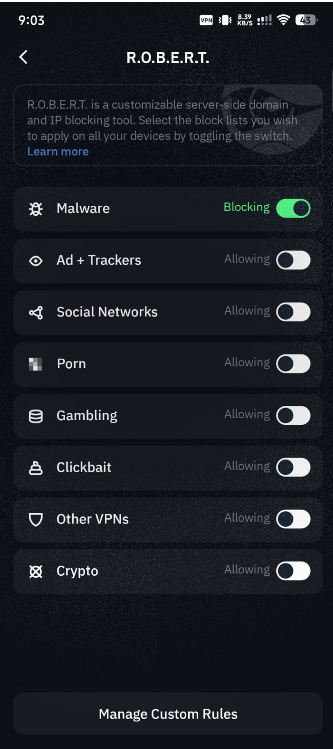
- R.O.B.E.R.T. to block ads, trackers, and malicious domains.
- Modern VPN protocols, including WireGuard and OpenVPN.
- Support for multiple devices under one account.
Is Windscribe VPN Safe and Trustworthy?
Yes, Windscribe is generally considered a safe and legitimate VPN for everyday use.
It uses strong encryption to protect your internet traffic, supports modern VPN protocols, and states that it follows a no-identifying-logs policy.
While no VPN can guarantee complete anonymity, Windscribe provides the security features most users expect from a reputable VPN service.
Why do many users trust Windscribe?
Here are some of the key security and privacy features offered by Windscribe:
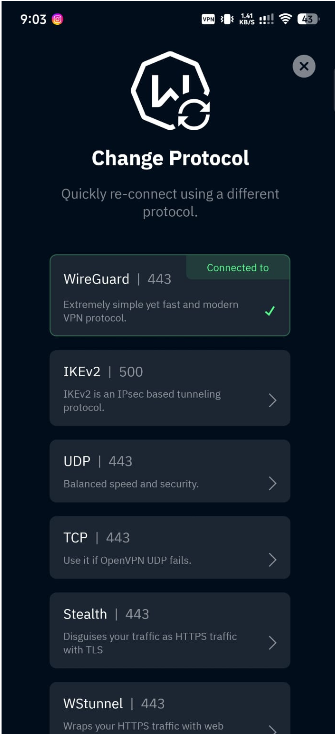
- Strong encryption to help secure your internet connection.
- Modern VPN protocols, including WireGuard and OpenVPN.
- No-identifying-logs policy, meaning it says it doesn’t store your browsing history or connection logs that identify your online activity.
- Firewall (Kill Switch) to help prevent accidental data exposure if the VPN connection drops.
- R.O.B.E.R.T. to block ads, trackers, malware domains, and other unwanted content.
Does Windscribe keep logs?
Windscribe states that it does not keep logs of your browsing activity, the websites you visit, or your original IP address while you’re connected to the VPN.
For most users, this privacy approach is suitable for everyday browsing, public Wi-Fi protection, and reducing online tracking.
Is Windscribe VPN Free?
Yes, Windscribe offers a free plan that lets you use its VPN without paying for a subscription.
While the free version has some limitations, it includes enough features for casual browsing, public Wi-Fi protection, and trying the service before deciding whether to upgrade.
What does the free plan include?
If you choose the free plan, you can expect:
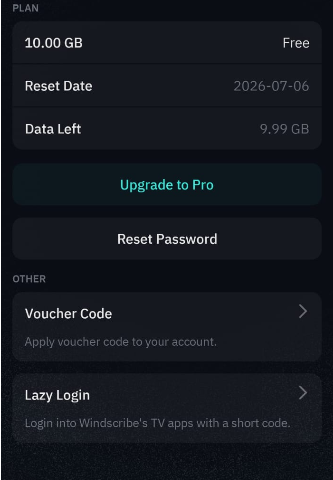
- A monthly data allowance for everyday browsing and light VPN use.
- Access to selected server locations instead of the full server network.
- The same secure encryption used by paid subscribers.
- Apps for Android, Windows, macOS, Linux, and iOS.
- Browser extensions for Chrome and Firefox.
What are the limitations?
Compared to the paid plan, the free version comes with a few restrictions:
- Fewer server locations to choose from.
- A monthly data cap that may not be enough for streaming or large downloads.
- Some premium features are reserved for paid subscribers.
- Heavy users may reach the monthly limit quickly.
Who is the free plan best for?
In my opinion, Windscribe’s free plan is a good choice if you:
- Want to try the VPN before paying.
- Mainly browse the web or use social media.
- Need extra protection on public Wi-Fi.
- Only use a VPN occasionally.
If you stream videos frequently, download large files, or keep your VPN connected throughout the day, you’ll likely benefit more from the paid plan.
My Experience Using Windscribe VPN on Android
After installing and using Windscribe VPN on my Android phone, I found it easy to set up, simple to navigate, and reliable for everyday browsing.
The app didn’t take long to configure, and I was able to connect to a VPN server within a few minutes of creating my account.
Installation and Setup
I downloaded Windscribe from the Google Play Store and completed the installation in just a few minutes. Creating an account was straightforward, and the app guided me through the permissions required to establish a VPN connection on Android.
Overall, the onboarding process felt beginner-friendly, with clear instructions that made it easy to get started.
User Interface
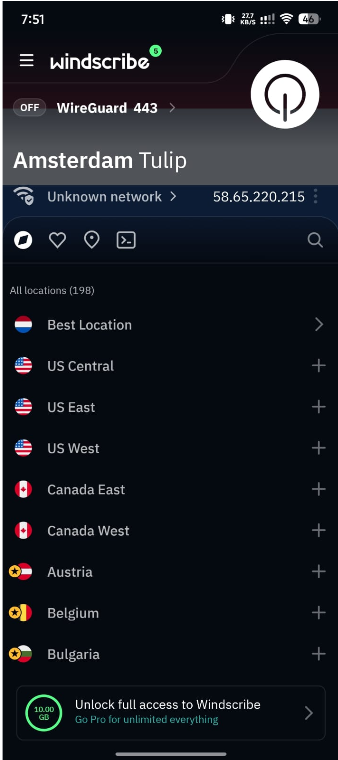
One of the first things I noticed was the clean and uncluttered interface. The main screen displays the connection button, selected server location, and account information without overwhelming you with too many options.
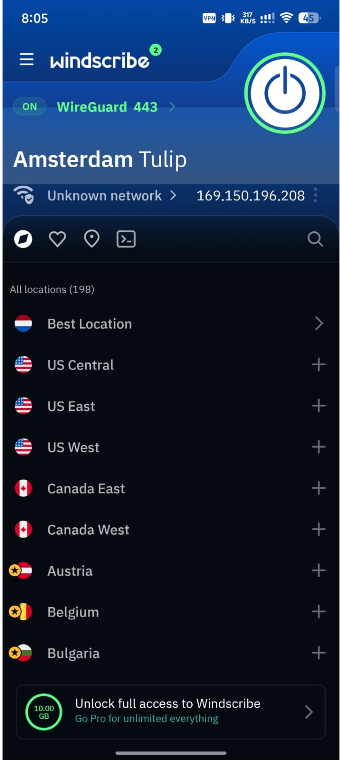
Switching between server locations was quick, and I didn’t have to dig through multiple menus to find important settings.
Everyday Usage
For my day-to-day testing, I used Windscribe while browsing websites, checking emails, using social media, and watching a few online videos.
The connection remained stable throughout my testing, and reconnecting to a different server only took a few seconds.
I also appreciated how easy it was to monitor my remaining data allowance on the free plan, as it’s displayed directly within the app.
What I Liked
- The app was quick to install and easy to configure.
- The interface felt clean and beginner-friendly.
- Connecting to a server only required a couple of taps.
- Server switching was smooth during my testing.
- The app clearly showed my connection status and remaining free data.
Windscribe VPN Performance: How Well Does It Work?
In my testing, Windscribe VPN performed well for everyday use, including web browsing, social media, and watching online videos.
The connection remained stable, and I didn’t experience any unexpected disconnects during normal usage.
Here’s what I noticed:
- Web browsing: Websites loaded quickly on nearby servers with no noticeable slowdowns.
- Video streaming: Videos played smoothly during my testing, although performance may vary depending on the platform and server.
- Server switching: Changing server locations only took a few seconds.
- Connection stability: The VPN stayed connected throughout my browsing sessions.
A Few Things to Keep in Mind
Your experience may differ based on your internet speed, chosen server, and location. Like any VPN, using a server that’s closer to you generally provides better performance.
Windscribe Pricing: Is the Paid Plan Worth It?
Yes, Windscribe offers a paid plan that unlocks more server locations, unlimited data, and additional premium features.
If you only use a VPN occasionally, the free plan may be enough. However, frequent users will likely get better value from the paid subscription.
What do you get with the paid plan?
Upgrading to Windscribe Pro gives you access to:
- Unlimited data for everyday use.
- More server locations around the world.
- Faster access to the complete server network.
- Premium features that aren’t available on the free plan.
Is it worth upgrading?
In my opinion, it depends on how you use a VPN.
The free plan is suitable for light browsing, public Wi-Fi protection, and trying the service before committing.
The paid plan is a better choice if you:
- Use a VPN every day.
- Stream content regularly.
- Need access to more server locations.
- Want unlimited data without monthly limits.
Who Should Use Windscribe VPN?
Windscribe VPN is a good choice for users who want a simple, privacy-focused VPN with the option to start for free.
Based on my testing and overall experience, it’s especially suitable for the following types of users:
Windscribe is a good fit if you:
- Want a reliable free VPN before paying for a subscription.
- Use public Wi-Fi regularly and want an extra layer of security.
- Are new to VPNs and prefer a clean, beginner-friendly interface.
- Need a VPN for everyday browsing, social media, and light streaming.
- Use multiple devices, such as an Android phone, Windows PC, or browser extension.
You may want to consider other options if you:
- Need unlimited data without upgrading to a paid plan.
- Require access to every available server location.
- Rely heavily on a VPN for high-bandwidth activities like frequent 4K streaming or large downloads.
- Need specialized features that are only available with certain premium VPN providers.
People Also Ask About Windscribe VPN
Does Windscribe support torrenting?
Yes, Windscribe supports P2P traffic on supported servers. Always use it responsibly and comply with copyright laws and local regulations.
Can I use Windscribe VPN on multiple devices?
Yes. Windscribe is available for Android, iPhone, Windows, macOS, Linux, and major web browsers, allowing you to use your account across multiple compatible devices.
Does Windscribe VPN slow down your internet?
A slight speed reduction is normal with any VPN. In my testing, Windscribe remained fast enough for everyday browsing and video streaming, although speeds depend on your server and internet connection.
Does Windscribe offer a Chrome extension?
Yes. Windscribe offers a browser extension for Google Chrome, along with support for Firefox and other platforms.
How do I cancel my Windscribe subscription?
You can cancel your subscription from your Windscribe account dashboard. If you subscribed through Google Play or the Apple App Store, you’ll need to cancel it through your device’s subscription settings.
Is Windscribe VPN good for beginners?
Yes. I found the Android app easy to install, simple to navigate, and suitable for users who are new to VPNs.
My Final Thoughts on Windscribe VPN
After spending time using Windscribe VPN on my Android phone, I found it to be a reliable and beginner-friendly VPN that delivers a good balance of privacy, ease of use, and performance.
The setup process was simple, the app was easy to navigate, and the free plan offered enough functionality to get a real feel for the service before considering an upgrade.
Of course, no VPN is perfect, and Windscribe has a few limitations, especially if you need unlimited data or access to every server location without paying.
However, for everyday browsing, securing public Wi-Fi, and improving online privacy, it performed well during my testing and met my expectations.