RCS vs SMS Android: What’s the Difference & How to Enable RCS
The debate around RCS vs SMS Android has become increasingly important as messaging technology continues to evolve. SMS has been the standard texting method for decades, but Rich Communication Services (RCS) offers a modern alternative with advanced features similar to popular messaging apps.
Android users are now seeing more devices and carriers support RCS, making it a practical replacement for traditional text messaging. Understanding the differences between RCS and SMS can help you take advantage of improved communication features. This guide explains how both technologies work, their key differences, and how to enable RCS on your Android smartphone.
What Is SMS?
Short Message Service, commonly known as SMS, is one of the oldest mobile communication technologies still in use today. SMS allows users to send text messages between mobile devices using cellular networks. Messages are typically limited to 160 characters and do not require an internet connection.
Because SMS relies on carrier networks, it works on virtually all mobile phones regardless of operating system or device age. Despite its reliability and universal compatibility, SMS lacks many modern messaging features. It remains useful for basic communication but falls behind newer technologies in terms of functionality and user experience.
What Is RCS?
Rich Communication Services, or RCS, is a modern messaging standard designed to replace SMS and MMS. Unlike traditional texting, RCS uses an internet connection through mobile data or Wi-Fi to deliver messages. It supports advanced features such as typing indicators, read receipts, high-quality image sharing, group chats, and larger file transfers.
RCS aims to provide a messaging experience similar to popular apps while remaining integrated into the default Android messaging application. As more carriers and smartphone manufacturers adopt RCS, it is becoming the next generation of mobile messaging for Android users worldwide.
Why RCS Was Created
SMS was developed during an era when mobile phones had limited capabilities and internet access was uncommon. As smartphones evolved, users began expecting richer communication experiences. Messaging applications such as WhatsApp, Telegram, and Facebook Messenger introduced features that SMS could not support.
RCS was created to modernize carrier-based messaging while maintaining compatibility with existing mobile networks. The goal was to provide enhanced communication features without requiring users to install third-party android apps. By combining the simplicity of texting with modern messaging capabilities, RCS bridges the gap between traditional SMS and internet-based messaging platforms.
Key Differences Between RCS and SMS
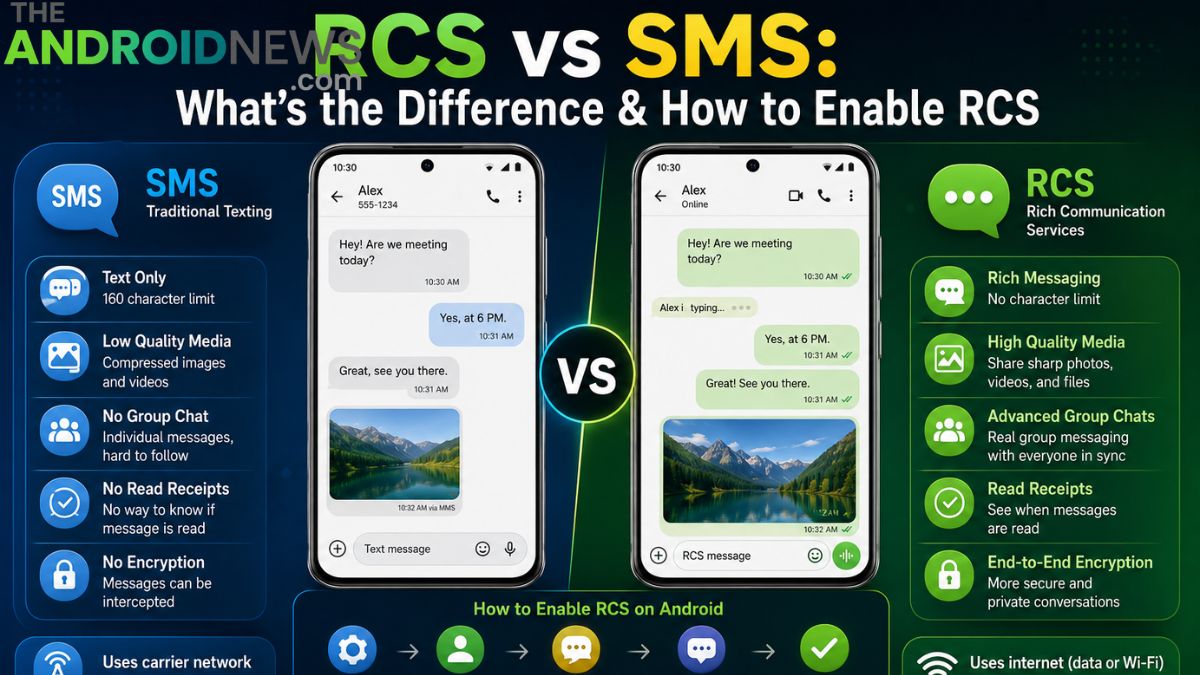
The primary difference between RCS and SMS lies in their capabilities and delivery methods. SMS uses cellular networks and supports only basic text communication. RCS relies on internet connectivity and enables advanced features such as read receipts, typing indicators, rich media sharing, and interactive group conversations.
SMS messages have character limitations and reduced media quality, while RCS supports larger messages and high-resolution content. RCS also offers improved user experiences through real-time communication features. These enhancements make RCS feel more like a modern messaging application while preserving the convenience of traditional texting.
Message Delivery Methods
SMS messages travel through carrier-controlled cellular infrastructure and do not require internet access. This makes SMS highly reliable in areas with limited data connectivity. RCS messages, however, are transmitted over the internet using mobile data or Wi-Fi networks. Because of this, RCS can support richer content and faster communication features.
If an internet connection is unavailable, many Android messaging apps automatically fall back to SMS when necessary. This hybrid approach ensures that users can continue communicating even when advanced messaging services are temporarily unavailable due to network limitations.
Media Sharing Capabilities
One of the biggest advantages of RCS over SMS is media sharing quality. Traditional SMS and MMS messages often compress photos and videos significantly, resulting in lower-quality media. RCS supports high-resolution image sharing and larger file transfers, allowing users to send clearer photos and videos.

This improvement is especially valuable for people who frequently share multimedia content with friends, family, or coworkers. The enhanced media experience eliminates many frustrations associated with traditional messaging. Android users who switch to RCS often notice an immediate improvement in the quality of shared images and videos.
Read Receipts and Typing Indicators
Modern messaging users expect features that provide real-time communication feedback. RCS includes read receipts that indicate when a message has been viewed by the recipient. It also supports typing indicators, allowing users to see when someone is actively composing a reply.
These features create a more interactive and engaging messaging experience. SMS does not provide any built-in mechanism for confirming message reads or displaying typing activity. For users accustomed to modern messaging apps, RCS offers a familiar and convenient communication environment directly within the Android messaging application.
Group Chat Improvements
Group messaging is another area where RCS significantly outperforms SMS. Traditional SMS group chats can become confusing because responses are often sent individually rather than within a unified conversation. RCS supports advanced group chat functionality with centralized conversations, participant management, and richer media sharing.
Users can see who has read messages and who is actively responding. These improvements make group communication more organized and efficient. Whether coordinating events, collaborating on projects, or chatting with friends, RCS group chats provide a substantially better experience than traditional SMS messaging.
Security and Privacy Features
Security is an increasingly important consideration in digital communication. SMS messages are not encrypted and can be vulnerable to interception under certain circumstances. Many RCS implementations now support end-to-end encryption for one-on-one conversations and, in some cases, group chats.
This added layer of protection helps safeguard message content from unauthorized access. While RCS security may vary depending on the messaging platform and implementation, it generally offers stronger privacy protections than SMS. Users who value secure communication should consider enabling RCS whenever it is available on their devices.
Advantages of SMS
Despite its limitations, SMS continues to offer several important advantages. It works on virtually every mobile phone and does not require internet connectivity. SMS remains highly reliable in areas where data coverage is weak or unavailable. Businesses frequently use SMS for verification codes, alerts, and notifications because of its universal compatibility.
Emergency communication services also rely heavily on SMS infrastructure. For basic text communication, SMS remains a dependable option. Its simplicity and widespread availability ensure that it will continue to play an important role in mobile communication for the foreseeable future.
Advantages of RCS
RCS delivers a significantly richer communication experience than SMS. Users benefit from enhanced media sharing, read receipts, typing indicators, improved group chats, and stronger security features. The ability to send larger files and higher-quality content makes conversations more engaging and productive.
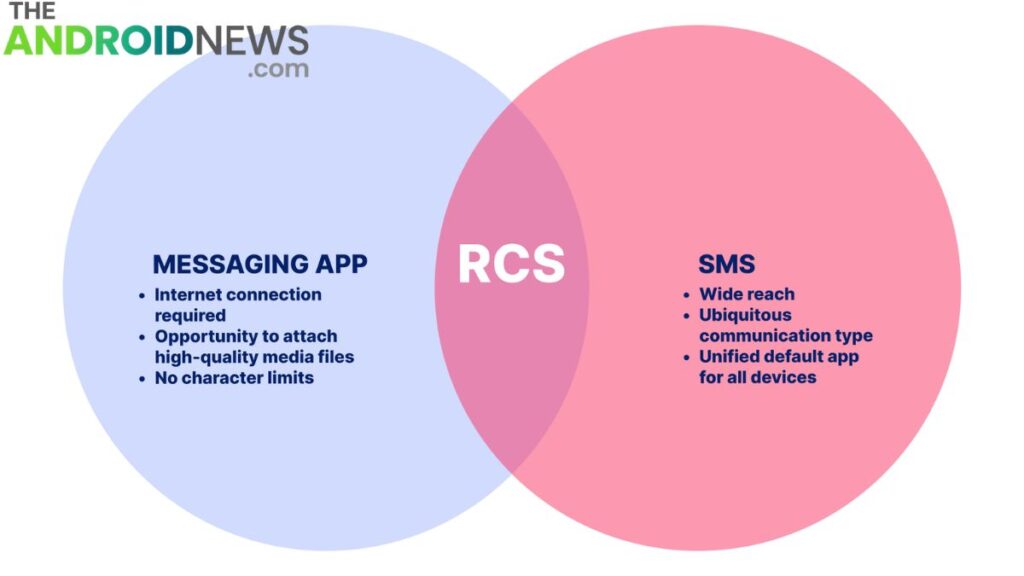
RCS also integrates seamlessly with Android’s default messaging applications, reducing the need for third-party messaging services. As carrier support expands globally, RCS is becoming increasingly accessible to Android users. For those seeking modern messaging functionality without leaving their default messaging app, RCS offers a compelling solution.
How to Enable RCS on Android
Enabling RCS on Android is usually a straightforward process. Open the Google Messages app and tap your profile icon. Navigate to Messages Settings and select RCS Chats or Chat Features. If your device and carrier support RCS, you will see an option to enable the feature.
Follow the on-screen instructions to verify your phone number and activate chat services. Once the setup is complete, RCS features become available automatically when messaging other RCS-enabled users. Activation may take a few minutes depending on your carrier and network conditions.
Troubleshooting RCS Activation Problems
Some users may encounter difficulties when enabling RCS. Common issues include carrier incompatibility, outdated messaging apps, unstable internet connections, or verification delays. Ensuring that Google Messages is updated to the latest version often resolves activation problems.
Restarting the device and clearing the app cache can also help. In some cases, carrier support may be required before RCS can function properly. Checking network settings and ensuring mobile data access is enabled may improve activation success. Most RCS issues can be resolved through basic troubleshooting and software updates.
The Future of Messaging on Android
The future of Android messaging is increasingly centered around RCS. As smartphone manufacturers, carriers, and technology companies continue supporting the standard, adoption rates are expected to grow significantly. Enhanced encryption, richer media capabilities, and improved cross-platform compatibility will likely drive further innovation.
RCS aims to create a more unified messaging experience that rivals dedicated messaging applications. While SMS will continue serving as a fallback option, RCS is positioned to become the primary messaging standard for Android users. Its expanding feature set reflects the growing demand for modern, interactive communication tools.
Final Words
Understanding RCS vs SMS Android is essential for anyone who wants to make the most of modern mobile communication. SMS remains reliable, universal, and effective for basic messaging, but it lacks many features users expect today. RCS introduces advanced capabilities such as read receipts, typing indicators, high-quality media sharing, group chats, and improved security.
These enhancements provide a richer and more engaging communication experience. By enabling RCS on your Android device, you can enjoy many benefits of modern messaging while continuing to use your default texting application. As adoption grows, RCS is set to become the future of Android messaging.
RCS vs SMS Android: FAQs
What is the difference between RCS and SMS on Android?
RCS is a modern messaging standard that supports features like read receipts, typing indicators, high-quality media sharing, and group chats. SMS is a traditional texting service that only supports basic text messages and limited multimedia features.
Is RCS better than SMS?
Yes, RCS offers a much richer messaging experience than SMS. It includes advanced features such as larger file sharing, Wi-Fi messaging, read receipts, typing indicators, and improved security.
How do I enable RCS on my Android phone?
Open the Google Messages app, tap your profile icon, go to Messages Settings > RCS Chats, and turn on RCS Chats. Follow the verification process to activate the feature.
Is RCS messaging secure?
Many RCS conversations support end-to-end encryption, providing better privacy and security than traditional SMS, which is not encrypted.
Does RCS require an internet connection?
Yes, RCS uses mobile data or Wi-Fi to send messages and media. If internet access is unavailable, your phone may automatically send messages as SMS instead.