Why is my phone overheating? Top causes and fixes in 2026
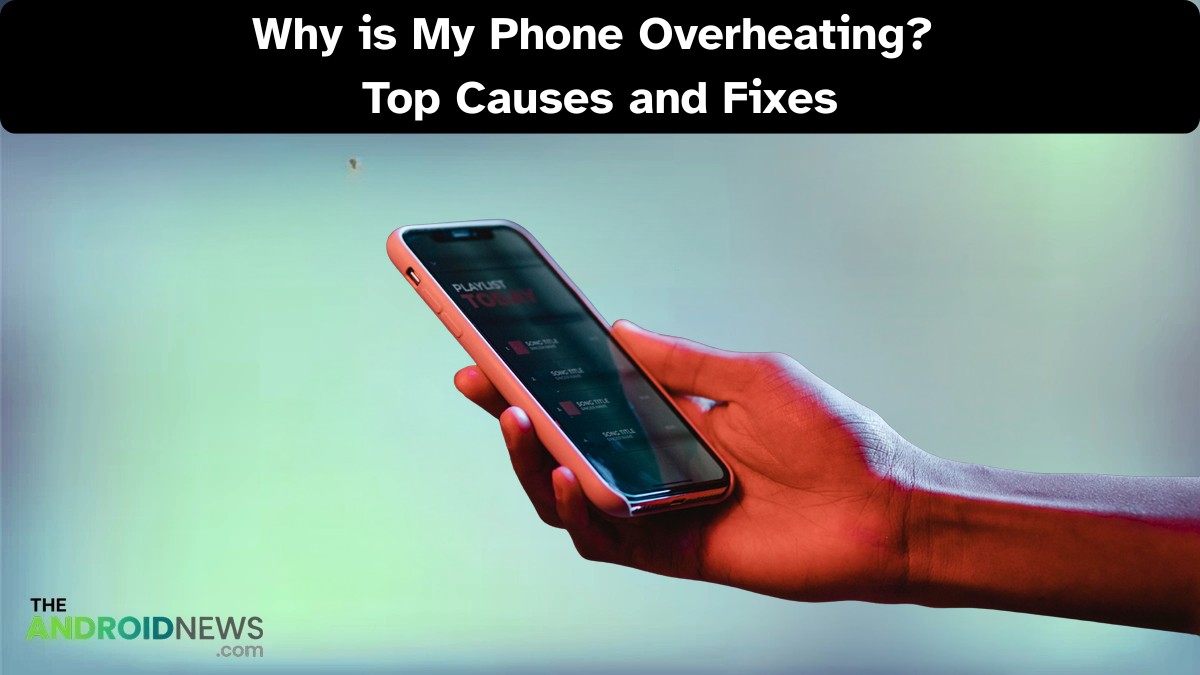
Why is my phone overheating? In a world where smartphones dominate our daily lives, it may shock you to learn that a staggering 50% of users experience phone overheating issues at some point.
This phenomenon can lead to reduced performance, shortened battery life, and even potential hardware damage.
I will explore the top causes behind your phone’s excessive heat and offer practical fixes to help you maintain optimal performance.
Why is my phone overheating and How to Fix It?
A phone can overheat for several reasons, primarily when operating outside its safe temperature range of 0°C to 35°C (32°F to 95°F).
Excessive heat not only shortens battery life but also triggers the processor to slow down, impacting your overall user experience.
Lurking spyware or cryptojackers may exploit your phone’s resources, running intensive background processes that you might not even be aware of.
Why is my phone so hot? The 7 most common causes
Why is my phone getting hot? It often points to one of seven common causes that can impact performance and safety.
You’re using power-intensive apps.
When you run power-intensive apps like 3D games, stream 4K video, or use continuous GPS navigation, your phone’s CPU and GPU kick into overdrive, causing it to heat up significantly.
This intense processing can boost your device’s temperature to alarming levels, with demanding tasks like video chat often reaching over 50°C (122°F) within just ten minutes.
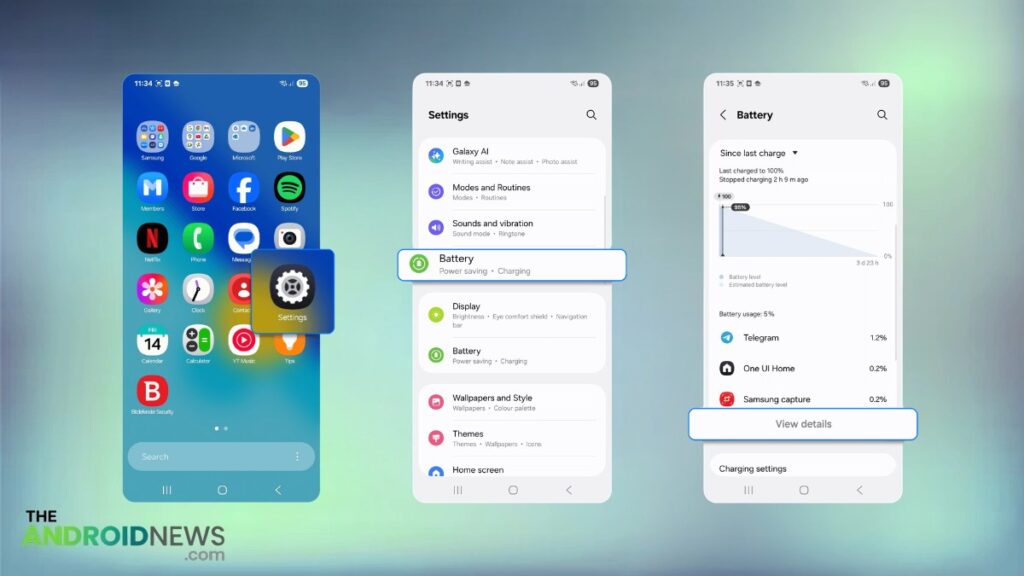
How to check:
Navigate to Settings > Battery > View Details, and scrutinize which apps are consuming the most background power.
You’re in a hot environment.
One of the simplest yet most impactful actions you can take is to avoid leaving your phone in direct sunlight.
High temperatures can push your device outside the safe operating range of 0°C to 35°C, leading to permanent damage.
Beyond the battery, the CPU may also suffer, slowing down or malfunctioning due to excessive heat.
You have too many apps running.
Running too many apps simultaneously can lead to significant strain on your phone’s processor (CPU), even if you’ve swiped them away from your main screen.
Background activities, like refreshing social media feeds, receiving messages, and tracking location, continue to consume resources, pushing your device to heavy multitasking.
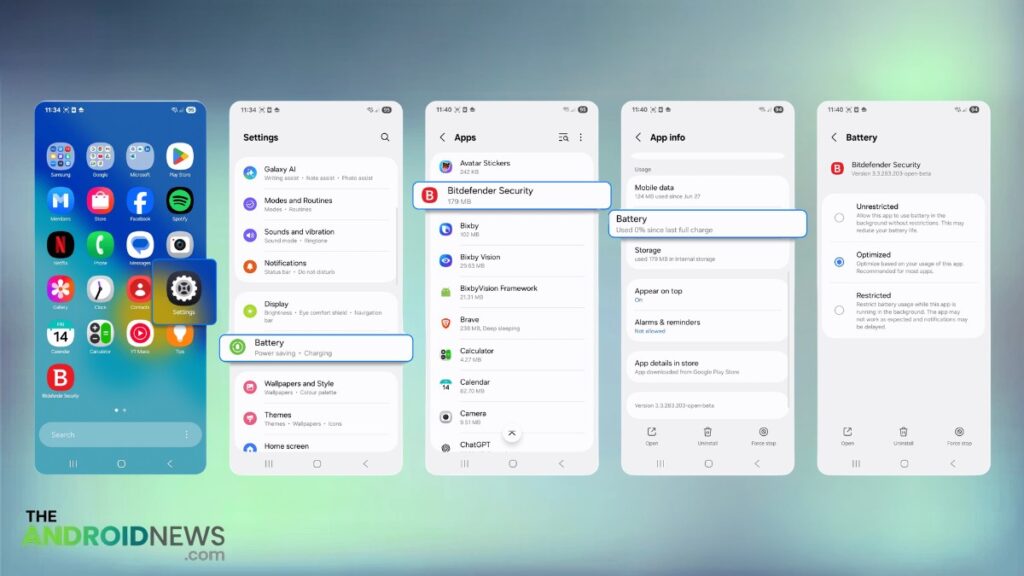
How to check and fix:
You can easily restrict unnecessary app activity by navigating to Settings > Apps > [Select App] > Battery and setting it to “Restricted.”
You have charging issues
Charging inherently generates heat, but using faulty or uncertified chargers exacerbates the problem, leading to even more overheating.
Wireless charging offers convenience, but it typically produces more heat compared to traditional cable charging.
Charging on soft surfaces like beds or sofas can trap heat and block airflow, making overheating more likely.
Read More: YouTube Is Finally on Android Auto, But There Is a Catch That Changes Everything
Your software is out of date.
Outdated software and pending app updates can trigger an “Update Available” notification that not only disrupts your day but may also cause your phone to overheat.
When you let these updates linger, you invite potential software bugs that generate unnecessary processing work, draining your battery and causing excess heat.
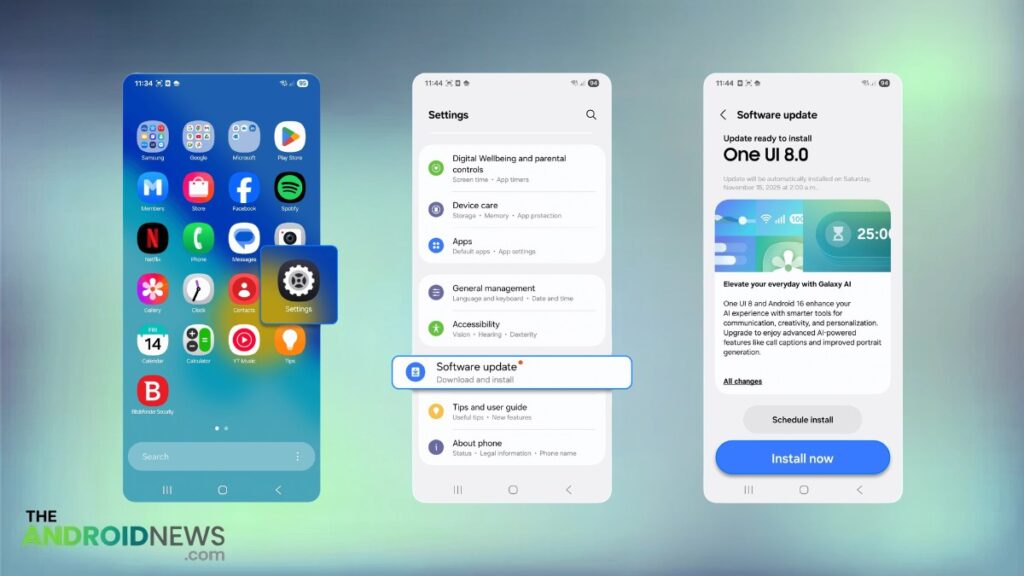
How to check and fix:
Simply navigate to Settings > System > Software Update on your Android device to apply important security patches and performance fixes.
You have a poor signal (Wi-Fi or cellular)
A poor Wi-Fi or cellular signal forces your phone’s antenna to work harder, resulting in increased power consumption and extra heat generation.
If you find yourself in a low-signal area, consider enabling airplane mode to halt this endless cycle, allowing your phone to cool down and conserve its resources.
The hidden causes behind malicious apps (malware)
One of the hidden culprits might be malicious apps, or malware, that run heavy background processes.

These malicious programs exploit your device’s CPU and GPU resources, raising the temperature and increasing energy consumption.
Understanding the nuances of malware types can empower you to take preventive action.
- Cryptojacking: Uses CPU/GPU to mine cryptocurrency, often leading to overheating and slower performance.
- Spyware: Tracks user activity and GPS data, leading to persistent data transmission and potential heat buildup.
- Adware: Generates continuous ads and pop-ups, significantly increasing resource usage and battery drain.
- Trojans: Disguise themselves as legitimate apps, pushing processors to their limits and risking battery damage.
- Ransomware: Encrypts files, causing sudden spikes in CPU load and excessive heat generation.
- Botnets: Turns your device into part of a network for attacks or spam, leading to constant background activity and overheating.
How to cool down your phone with 5 simple fixes?
How to stop phone from overheating? Here are five simple fixes to cool down your device quickly and safely:
- Move to a Cool, Shaded Place: Ensure your phone is out of direct sunlight, which can exacerbate overheating.
- Remove the Phone Case: This allows heat to escape more efficiently, reducing the risk of heat build-up.
- Unplug Charging and Close Heavy Apps: Disconnect your charger and shut down resource-intensive apps like games, videos, or GPS that contribute to the heat.
- Turn On Airplane Mode: This disables network activity, lowering the load on your phone and decreasing heat production.
- Reduce Screen Brightness: Lowering the brightness can substantially decrease both heat and power usage, keeping your phone cooler.
Read More: Top 12 Free Android Security & Privacy Apps You Can Trust
Conclusion
Why is my phone overheating? Understanding the various causes and their corresponding fixes is crucial for maintaining your device’s longevity.
Regular maintenance, such as software updates and managing background processes, can significantly mitigate overheating risks.
FAQs
Why Does My Phone Get Hot?
Your phone can get hot for several reasons, including high processor usage due to demanding apps, poor ventilation, or exposure to direct sunlight.
How Do I Stop My Phone From Constantly Overheating?
Removing its case, closing any background apps, lowering the screen brightness, and keeping the device out of direct sunlight can significantly help in managing its temperature.
Why is my phone overheating?
Your phone may be overheating due to excessive workload on the processor from activities like gaming, streaming, or running numerous background apps.