Google Is Killing Drive for Desktop’s Photos Sync and Here Are Your Deadlines
If you have been quietly relying on Google Drive for desktop to automatically back up your DSLR shots, camera roll folders, or any local photo library directly into Google Photos, that workflow has an expiration date.
Google has begun emailing affected users with a two-stage shutdown timeline, and the first deadline arrives next month.
What Is Being Removed and When
According to Android Police, Google will remove the ability to configure new backup folders for Google Photos through the Drive for desktop app starting June 15, 2026, at which point in-app notifications will also begin pushing existing users toward the transition.
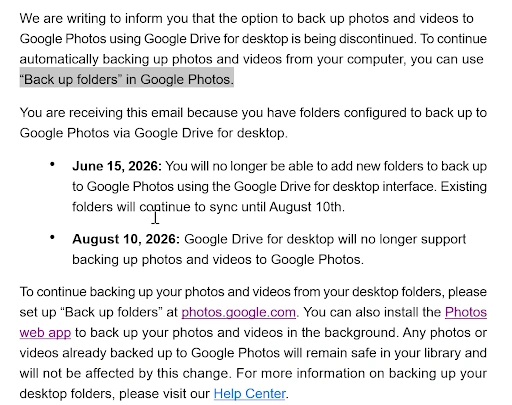
Google’s support documentation, posted in a subreddit r/googlephotos, confirms the full timeline: from the June timeline, configuration of new backup folders in the Drive for desktop app will no longer be available, though existing folders will still sync.
Starting August 10, 2026, Drive for desktop will end support for Google Photos backup entirely.
This change forces a workflow adjustment for power users who frequently offload and organize content from their Android devices through a PC or Mac interface.
What the Replacement Actually Looks Like
After August 10, users will need to use the “Back up folders” option directly on the Google Photos website, selecting folders through the browser and keeping the tab active or relying on web sync to maintain backups.
That is a meaningful downgrade for power users. The previous Drive for desktop integration worked silently in the background once configured, while the web-based replacement depends on active browser sessions, adding friction that did not exist before.
The biggest impact will be on photographers backing up NAS devices, external drives, or DSLR import folders.
These professional setups often rely on desktop software to bridge the gap between high-end hardware and mobile camera apps, benefiting from a client that runs continuously without manual intervention.
Previously backed-up content remains safe, with Google confirming that existing Google Photos libraries are unaffected. The change only impacts future backup workflows, not already stored files.
What to Do Before June 15
The most important step now is checking which folders are already configured in Drive for desktop under Preferences > Google Photos. Any folder not added before June 15 will need to use the Google Photos website method instead.
For users building a long-term photo backup strategy, Google Photos continues adding powerful on-device tools; the platform’s recent virtual wardrobe and AI try-on feature is one example of where investment is going.
But any backup method you rely on for irreplaceable media deserves scrutiny, and keeping your cloud storage and privacy practices tightly managed becomes more important when workflows change underneath you.
Source: Google Photos using Google Drive for desktop is being discontinued